Monday, April 22, 2019

Integrating New PayPal Smart Buttons with Vue.js Quasar and iOS



Integrating New PayPal Smart Buttons with Vue.js Quasar and iOS

This is my personal experience integrating the new PayPal Smart Payment Buttons with a reactive Vue.js framework called Quasar — I ran into problems and found solutions.

Today let’s code a PayPal Smart Payment Button Checkout.


Photo by Nicole Wolf on Unsplash

At quick glance everything looks great; copy the code into your project and mission complete.
Easy…
What if you are using reactive UI components such as QBtnDropdown for a shopping cart list?
Some developer background: my sandbox songxy.com uses Quasar (thanks to creator Razvan Stoenescu) a reactive Vue.js framework. It supports many platforms and browsers out of the box.
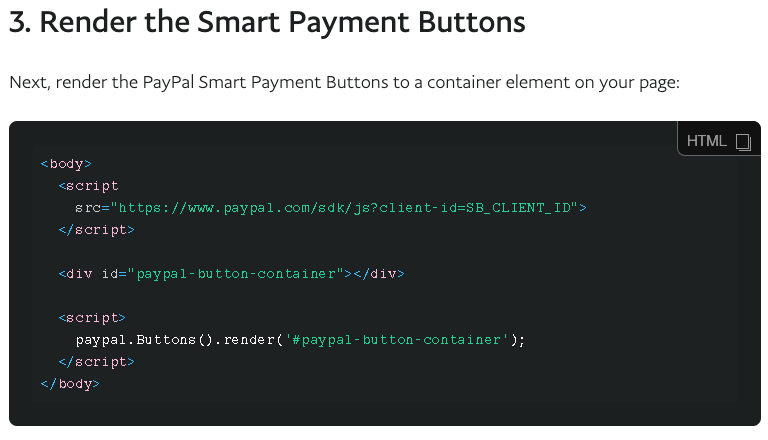

Understanding my requirements I continued with the PayPal example to step 3: render the button into my UI element.
Attempt #1 call PayPal render button function to render <div id=“paypal-button-container” /> inside of the drop down box whenever @click event was triggered by drop down button.


As you can see from the screenshot and the error message below this did not work.


It turns out <div id=“paypal-button-container” /> in my dropdown box is rendered dynamically and reactive on click events meaning it only exists when it dropped down. The PayPal smart buttons cannot find the div to render into.
Attempt #2 clicking a checkout button inside the dialog box calling the PayPal render button.
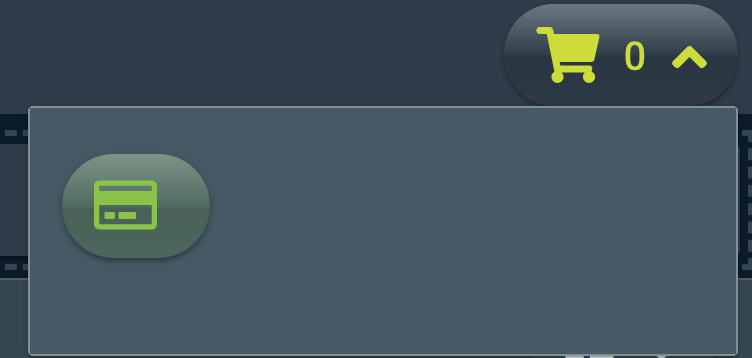

Clicked!


That worked because the button and div existed in the drop down when clicked. However, an extra click reduces customer conversion rates.
There must be a better way…
Attempt #3 add some more code Vue function $nextTick with PayPal render button.


Works!


But what happens when you run this on an iOS device such as iPad or iPhone?

Photo by FuYong Hua on Unsplash

Broken…


Every time your drop down box drops you will get a new blank space at the top that pushes your new working button down.
It keeps moving down indefinitely.
How do we solve this problem?

The solution here is to clear out the empty dynamic code that was left over by the PayPal Smart Button and not cleared for us by iOS. You can do it with the code below:


Next… Show me the money
Creating the checkout experience with UI customization — here we have itemized billing controlling item name, quantity, sku#, tax, price and currency.
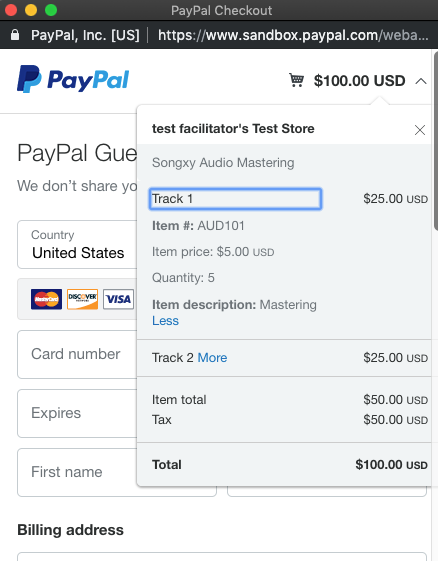

The documentation at PayPal was difficult for me to navigate through. I eventually worked out a way to do it.
How did I do it?
I passed the function paypal.Button() a dictionary it can understand.
Let’s begin with “style” — we wanted a responsive pill shaped button with a checkout label and no tagline. Gold was a nice color and our view was horizontal giving us a basic button. If you want to try different UI shapes and designs take a look at the link below for inspiration:
Follow the code gist below demonstrating style and itemized billing in the checkout window:

If you see Amazon AWS Amplify references in there it’s because that is my current backend and I wanted a way to store identifiable customer data within the checkout process and keep track of who paid what, when, where, and how.
I hope this helps people integrate with the new PayPal Smart Buttons.
If you know any other gotchas or special cases like the ones above please let me know and I’ll add them to the list.
Here is the official integration guide from PayPal

If I helped you in some way please clap and subscribe below:

Sign up for the newsletter!

Get solid gold sent to your inbox. Every week!


Tuesday, November 18, 2014

How to get Aptana Studio 3 to run on Yosemite 10.10.1

I was getting a very cryptic Java error message when attempting to start Aptana Studio 3 on Yosemite 10.10.1

The key to solving the problem was found here:
http://support.apple.com/kb/DL1572?viewlocale=en_US&locale=en_US

This is the official Java that is supported by Apple and fixed the issue after it was installed.

Thursday, January 16, 2014

How to Fix Gradle Build Errors with Android Studio

Hi Cross Linked Coders,

I was trying to build an old ADT project for Android with Android Studio 0.4.2 and I faced a whole bunch of error messages.

The errors were all related to an older gradle version.

Essentially deleting the gradle 1.8 folder and placing the gradle 1.9 folder was one of the many steps to fix this.

Build.gradle needed to be changed to:
classpath 'com.android.tools.build:gradle:0.7.+'
and
buildToolsVersion "19"
The final error message was the most cryptic essentially the build was error free but when attempting to run the application there was a gradle sync error message. What solved this was clicking on the "Sync Project with Gradle Files" button. Which looks like this on the toolbar:


After going through all this I found a somewhat interesting list to fix the gradle issues here:
http://tools.android.com/recent/androidstudio040released

However 0.4.2 is the latest Android Studio so their list is a little out of date but is still helpful.

One thing to note is adding external .jar libraries to projects that don't use gradle you can drag the jar files into the project and then right click on the file and add as a library to the project. If the project is using gradle simply create a "libs" folder in the project and add all the .jar libraries to that folder.

Update 1:
If you have multiple modules in your project to solve gradle errors it is best to use the same version for the following structures:
dependencies {
classpath 'com.android.tools.build:gradle:0.12.+'
}
android {
buildToolsVersion "20.0.0"
}

Update 2:
If you get an error such as:
UNEXPECTED TOP-LEVEL EXCEPTION: com.android.dex.DexException: Multiple dex files define...

Any Dex errors in my case have always been because a library has been included twice in the module or project, either through copying the .jar file to the project file space or through module library linking.

Update 3 -- Slightly off-topic:
If you have any Android SDK Manager errors when either downloading from a repository or repository information is not showing up or is out of date -- then the best thing to do is to delete all termporary files which is done through the JAVA settings of your computer.

Sunday, September 18, 2011

New Syntax to Array Indexing with C++

I was amazed to find a new syntax for indexing into arrays.
#include <iostream>

int a[] = {1, 12, 2, 8};

int b[] = {23, 11, 2, 3};

int main()
{
    int ind = 3;
    int c = ind[b][a];

    int d = 2[a][b];

    cout << "c = " << c << std::endl <<"d = " << d;

    return 0;
}
The Magic here is that the arrays are evaluated and indexed from left to right using integer variables or intrinsic integers.

c  =  8
d  =  2

Sunday, May 1, 2011

C++ polymorphic shock of passing derived object arrays into a base object pointer function parameter

Code example:

#include <cstdio>

class Mammal
{
public:
    virtual bool IsFurry() = 0;
};

class Dog : public Mammal
{
    bool isFurryBreed;
public:
    Dog() { isFurryBreed = false; }

    virtual bool IsFurry()
    {
        return isFurryBreed;
    }
};

//the line below didn't compile
//int FindFurryMammal(Mammal pMammals[], int arraySize)
int FindFurryMammal( Mammal *pMammals, int arraySize)
{
    for( int i = 0; i < arraySize; i++ )
    {
        if( pMammals[i].IsFurry() )
        {
            return i;
        }
    }
    return -1;
}

int main(int argc, char * argv[])
{
    Dog dogs[10];
    int found;

    found = FindFurryMammal(dogs, 10);

    printf("Furry mammal found at index %d\n", found);
    
    return 0;
}

The code above suffers from polymorphic shock. Indexing through pMammals would be ok if polymorphism downcasted all the indices of Dog into the Mammal base class. However, polymorphism can only cast one index at a time even if passed as a parameter to a function.
So two issues ensue where only the first index of Dog is casted to Mammal, and therefore, any indexing beyond index 0 of pMammals will result in the indexing of incorrect memory location. This results in an exception error thrown at run-time when the function IsFurry is called since that function does not exist at that memory location.

The dangers of C++ string literals and non-const pointers

Foreword: I originally gained insight into this issue from Pete Isensee's blog post "When it Rains".

For years I used to take this line of C++ code for granted:

const char* str = "abcdef";

However, const protects you from altering the defined string literal values which is a good programmer habbit.

Question:
Why is this important, and why do most programmers use it?

Answer:
It's very important because according to the standard 2.13.4/2 "the effect of attempting to modify a string literal is undefined"

Question:
What is the correct way to alter strings?

Answer:
If you want to dynamically change string values use a character array because it creates a copy of the string. Moreover, the character array will terminate nicely with the null character '\0'.

Correct declaration and defintion:
char str[] = "abcdef";

Don't do this because it is undefined:
char* str = "abcdef";
str[0] = 'k';

Do this instead:
char str[] = "abcdef";
str[0] = 'k';

C++ post and pre-increment operator overloading does not behave like intrinsic type operators

//C++ post and pre-increment operator overloading does not behave like intrinsic types
//Version: 1.00

#include <iostream>
using std::cout;
using std::endl;
using std::ostream;

class IntWrapper
{
  friend ostream & operator<<( ostream&, const IntWrapper& );

  public:
  IntWrapper( int val = 0 ) : i(val) {;}

  IntWrapper operator+( const IntWrapper& rhs) const
  {
    //use RVO
    return IntWrapper( this->i + rhs.i );
  }

  IntWrapper& operator++()
  {
    ++this->i;
    return *this;
  }

  IntWrapper operator++(int)
  {
    IntWrapper tmp(*this);
    this->operator++();
    return tmp;
  }

  private:
  int i;

};

ostream &operator<<( ostream &, const IntWrapper & );

int main()
{
  //interesting results of the post and pre increment operators

  IntWrapper test;
  int i = 0;

  IntWrapper test1 = test + test++;
  int test2 = i + i++;

  //test1 should be the same as test2 but they are not

  cout << test1 << " for intrinsic types test1 should be the same as test2 but is not since they are not intrinsic types " <<
  test2 << endl;

  cout << i << i++ << test << test++ << endl;

  system("pause");
}

ostream &operator<<( ostream &output, const IntWrapper &r )
{
  output << r.i;
  return output;
}

The conclusion to this experiment is that due to the unspecified behavior according to clause [5/4]
of the standard the assumption that overloading post and pre increment operators will behave in the same manner as the intrinsic type operators is incorrect and not waranted by the standard.